 Jason
a189980f35
Jason
a189980f35
Render the screenshots at 720px (560px for the cropped Codex model
picker) and center them, matching the published release body.
17 KiB
CC Switch v4.0
A redesigned interface, the new Aggregation mode, and safer config switching
This is the biggest CC Switch release yet. With it, we've rethought the core of the CC Switch experience: how you connect to models, how you switch providers, and how you manage a growing set of AI coding tools.
The interface has been redesigned from the sidebar to the tray, giving apps, config, usage and sessions each a clear place. The new Aggregation mode puts models from several providers into one Claude Code or Codex model picker, so you can switch between them right inside the client. Session management has been rewritten from scratch: what the AI did in each turn, what it changed and which step failed are all visible at a glance. And the config-writing core has been rebuilt: switching providers now replaces only the key fields instead of rewriting the whole file, which removes a great deal of complexity and puts an end to a whole class of lost-settings problems.
A Redesigned Interface
The new interface uses a sidebar layout and an orange theme. Switching apps, plus global features like MCP, Skills, Prompts, Sessions, Accounts and Usage, are all one click away in the sidebar.
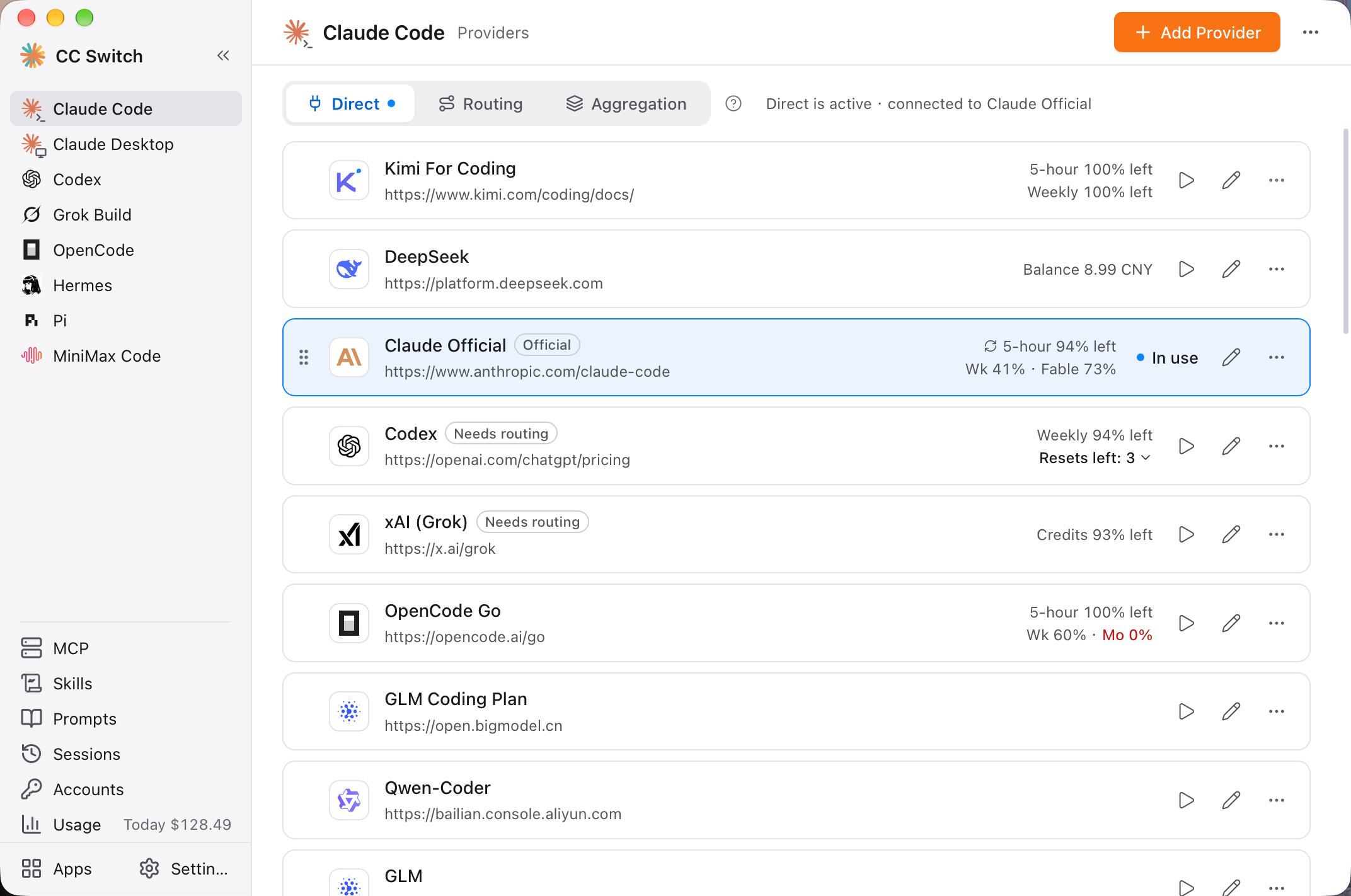
- Modes at a glance: Every app page has three tabs at the top: Direct / Routing / Aggregation. Clicking a tab only changes what you're looking at and never touches your config. The button that actually switches modes tells you what will happen, and going back to Direct takes one step and can be undone
- A home for your tools: The new Apps page shows each AI coding tool's version, install location and source, with install, upgrade and batch upgrade
- A cleaner Add Provider panel: Search, pick a preset, fill in the form. Search matches Chinese names and domains, and one vendor's plans and regions are merged into one row, so Claude's 96 presets now take 73 rows. Preset providers are no longer highlighted as recommendations
- Quota shows what's left: Cards read "5-hour 94% left" or "Balance 8.99 CNY", and each tier is followed by its reset countdown, like "⏱ 2h30m". Quota stays a quiet gray: a percentage turns bold when it drops below 10%, and a balance turns red only once it runs out. Click it to re-check and see the result. Codex subscriptions also show how many saved resets are left and when they expire
- Tray organized by app: Each row reads "name · mode · provider · quota", and submenus list only the providers you can switch to right now. The tray icon shows a dot only when something really needs your attention
- Settings grouped by purpose: General, App config, Local routing, Network, Data, About. Local routing's service status, listen address and failover settings now live in one place
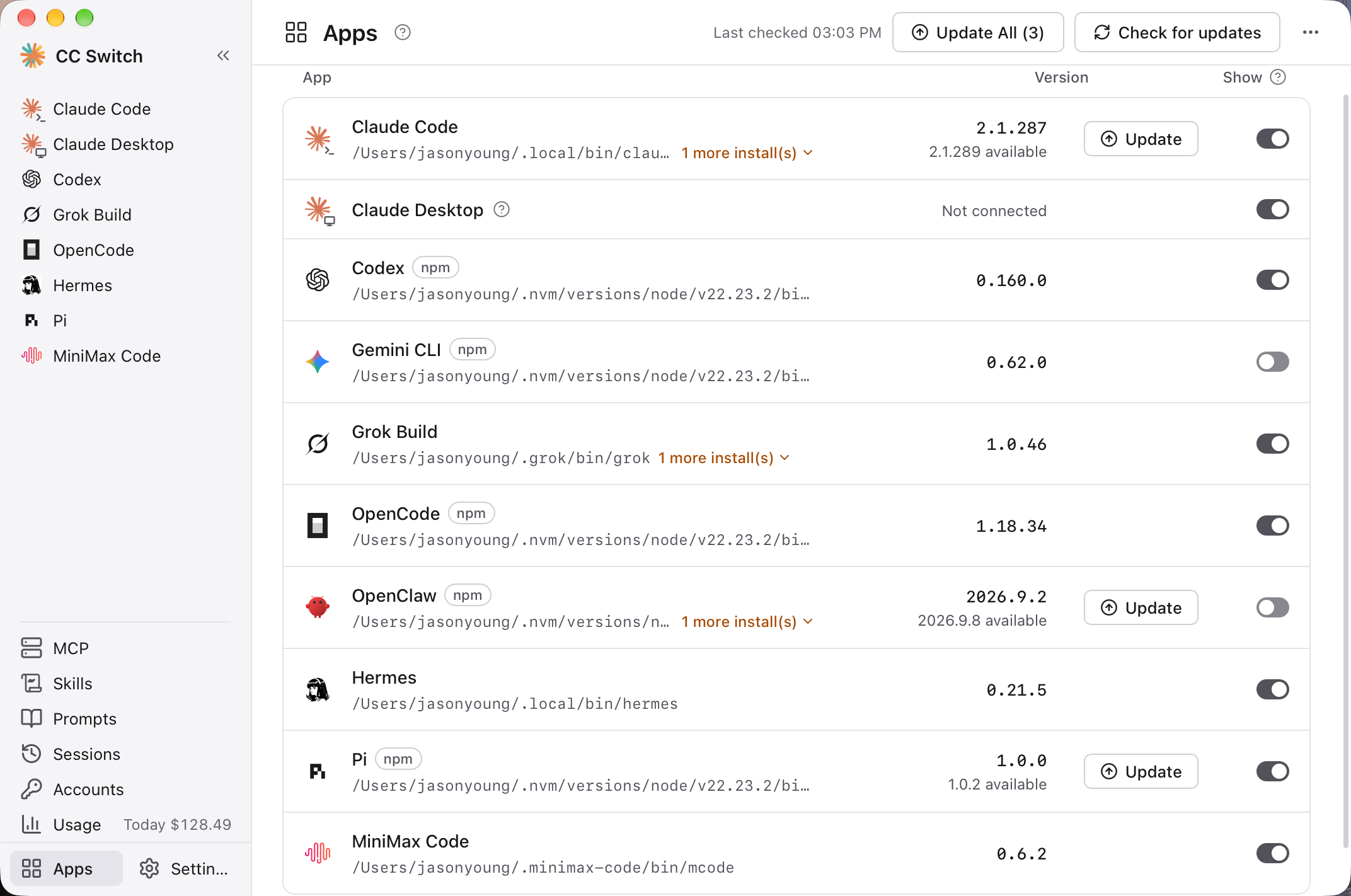
Upgrading users see a short note on first launch explaining where things have moved.
Aggregation: Many Providers, One Model Picker
Until now, using another provider's model meant going back to CC Switch, switching providers, and returning to your client.
Turn on Aggregation, add a few providers, and their models all show up together in the Claude Code or Codex model picker. Whichever model you pick, the request goes straight to that provider, without ever leaving the client.
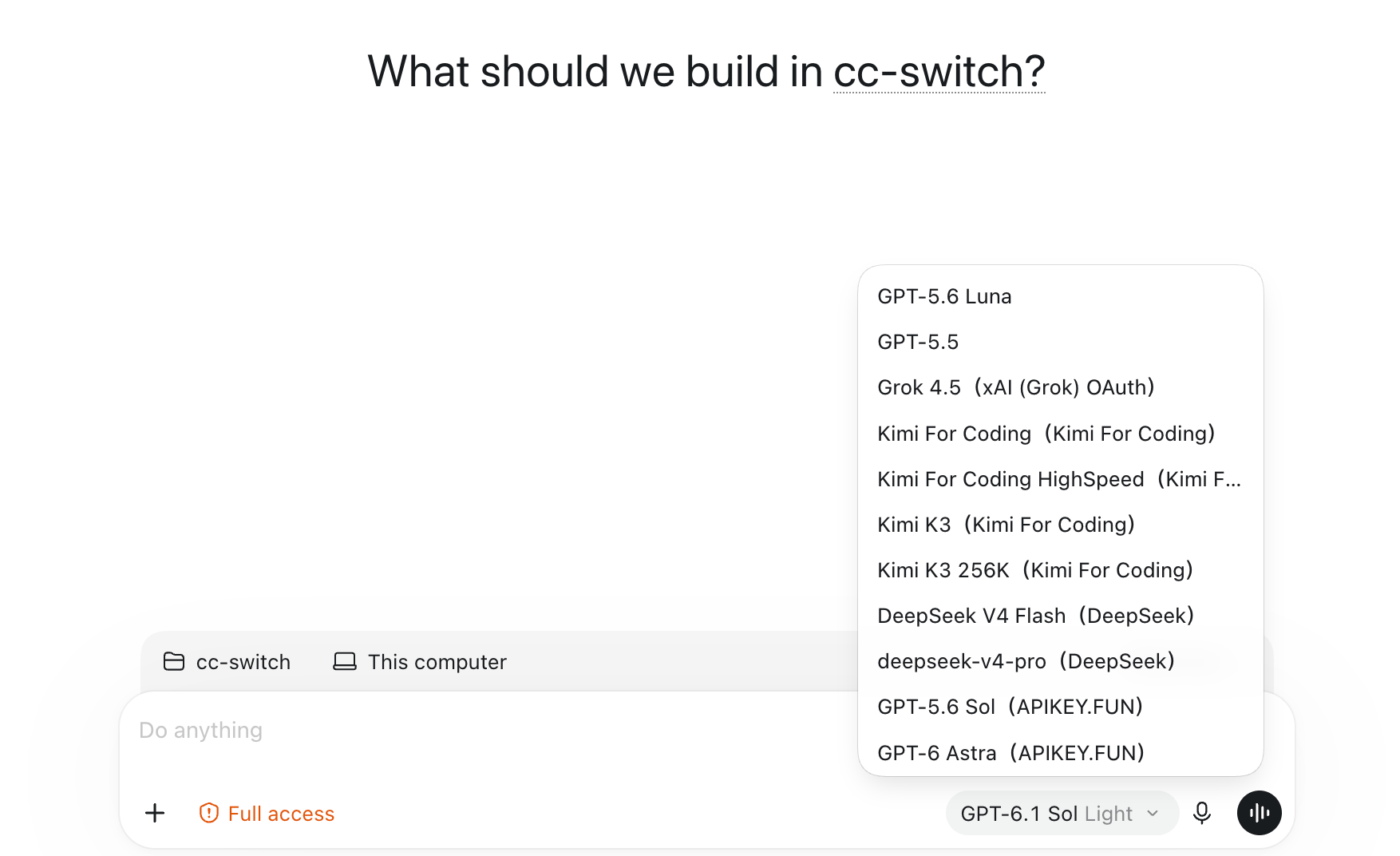
- Add and remove anytime: Click "Add" or "Remove" on a provider card, then choose one provider as the default to handle requests that don't name an aggregated model
- Know every model at a glance: Each model name carries its provider, like "Kimi K3 (Kimi For Coding)", and its description shows the real upstream model ID and context window, like
kimi-k3 · 256K - A streamlined form: Connection details and the model list sit on one page; that's all Aggregation needs
- Mix providers in Codex without errors: Set your official account as the default, and official and third-party models are listed side by side. Switch back and forth between providers' models and context compaction and reasoning state carry over
- Switch models mid-session: You can change to another model partway through a session. Note that after each switch, the new model has to build its prompt cache again, so the first turn after switching costs noticeably more
- Restart reminders: When the model list changes you're prompted to restart the client, and Codex CLI users can restart the background service from the banner in one click
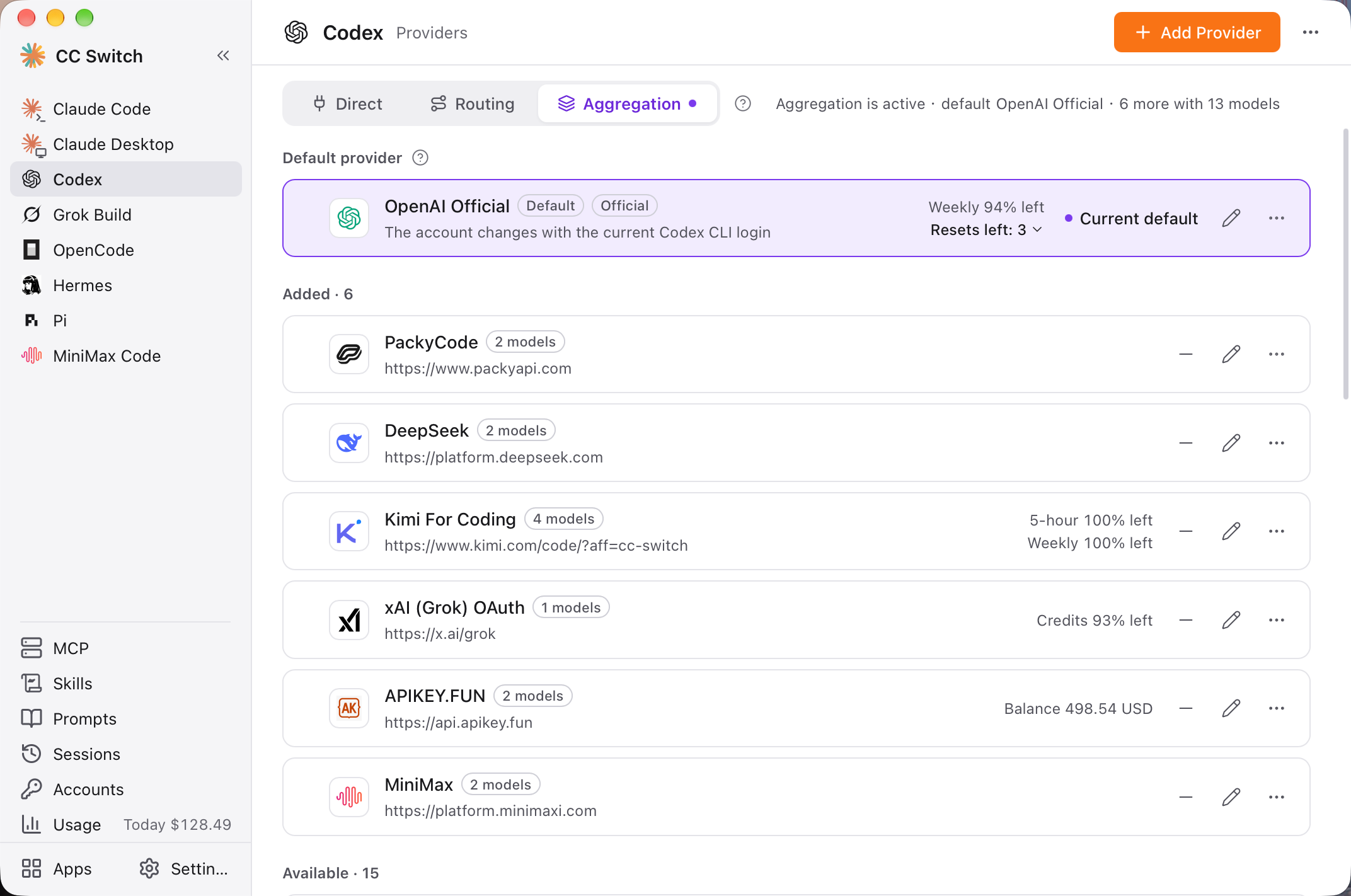
Aggregation is opt-in and currently supports Claude Code and Codex. It routes each request by the model you pick, and does not offer failover.
| Mode | How requests travel | Best for |
|---|---|---|
| Direct | The client talks to the provider directly | Everyday use |
| Routing | Through local routing to one provider, with protocol conversion and failover | Incompatible protocols, or when you need failover |
| Aggregation | Through local routing, dispatched by model to several providers | Mixing models from several providers in one session |
A Tribute to opencodex
Aggregation learned a great deal from opencodex and builds directly on its ideas: prefixing model IDs with the provider so models from many providers can share the Claude Code and Codex pickers; letting Codex compact context on third-party models; and detecting when a background service is still using an old model list, then prompting a restart. All of these came out of opencodex's exploration. Our thanks to its author (@lidge-jun) and contributors for open-sourcing this work, and our deepest respect for their open-source spirit!
If you want a tool dedicated to bringing any model into Codex and Claude Code, we highly recommend giving opencodex a try!
Session Management: See Every AI Coding Session Clearly
AI coding tools keep a complete record of every session on your machine, but the raw logs are thousands of lines of JSON and nearly impossible to read. This release rewrites session management from scratch to make those records as readable as possible, and adds token usage and cost for each session.
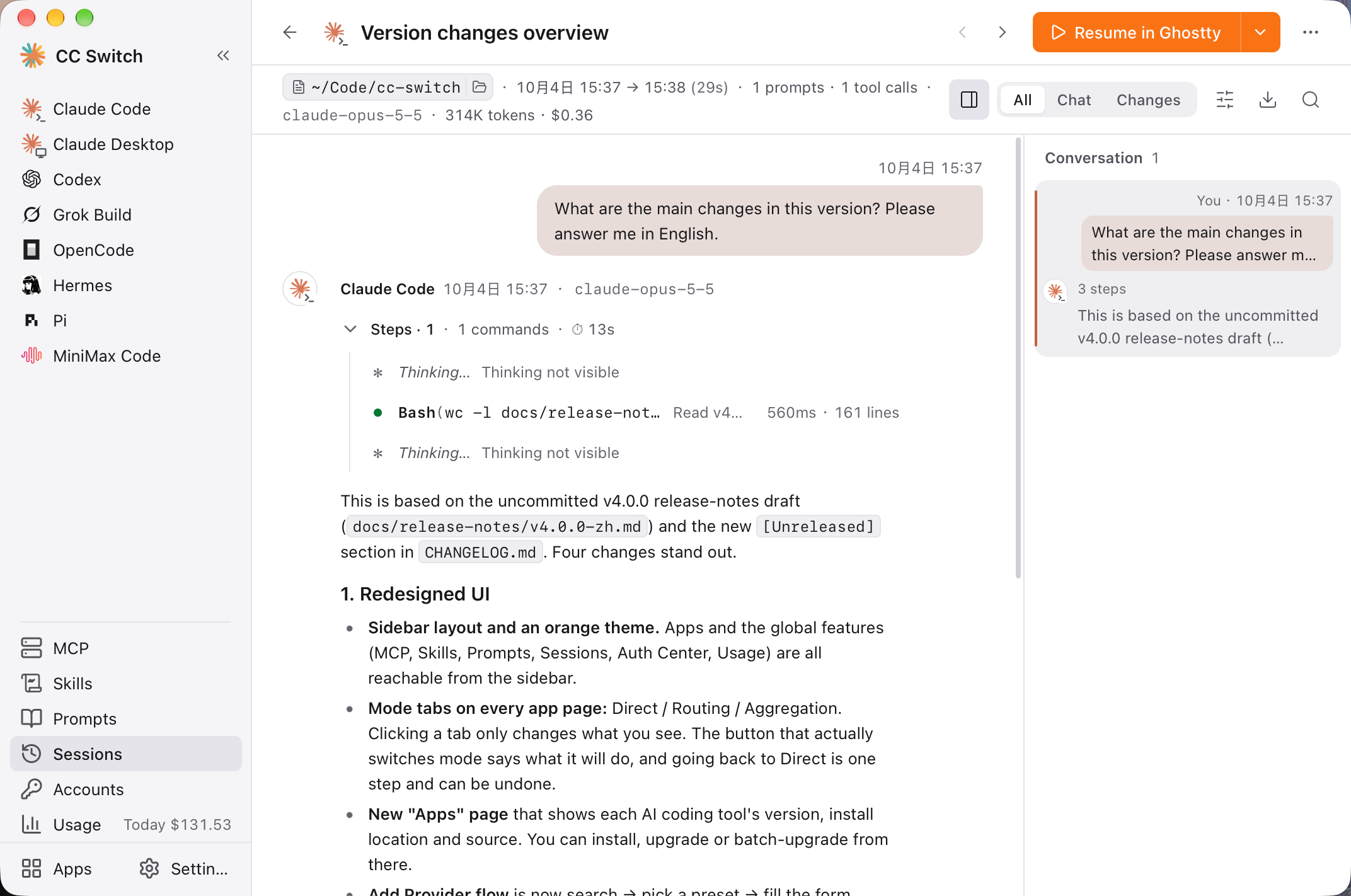
- Nine clients, one way to read them: Sessions from Claude Code, Codex, Gemini CLI, Grok Build, OpenCode, OpenClaw, Hermes, Pi and MiniMax Code are parsed into structured content, with text, thinking, tool calls, tool results and images each shown in their own form
- One turn, one summary line: A long run of AI actions folds into a single line, such as "Steps · 44 · 27 commands · 2 files changed · 1 failed · 27m45s". Failed commands are marked in red, and expanding one shows its parameters, output and exit code. Runs of file reads and searches merge into "Read N files, searched N times"
- Conversation outline: The right-hand panel lists each of your prompts along with how many steps the turn took and what it concluded. Turns with failed steps get a red dot; click to jump there
- Three views: "All" shows the full process, "Chat" shows only what you and the AI said, and "Changes" shows only which files were changed
- The whole session at a glance: The header shows the project directory, start and end time, number of prompts and tool calls, model, total tokens and the cost at API prices
- Find in session: Matches hidden inside folded tool output are expanded and scrolled into view automatically, and typing stays smooth even in long sessions
- From reading back to working: Resume a session in your favorite terminal (Ghostty, for example) in one click, or copy the resume command. You can also export to Markdown and copy a single turn or the whole conversation
- An easier-to-search list: Group by project or time, search titles, directories, first and last messages or session IDs, and delete in bulk
- OpenCode 2.x sessions are now supported, and Hermes sessions open correctly again
The session reader redesign was led by @Owlbay. Many thanks to Owlbay for the enormous effort.
Switch Providers, Keep Your Config Intact
This is the most important under-the-hood change in this release. It applies to Claude Code, Codex, Gemini CLI, Grok Build and Claude Desktop.
CC Switch launched in August 2025, when the API ecosystem was far less mature than it is today. API formats often differed widely between official and third-party providers, so the original design rewrote the whole config file on every switch. That choice brought a series of problems and a lot of complexity. Now that the ecosystem has matured, it's time to rebuild.
Before: Switching providers rewrote the entire config file from that provider's saved snapshot. Hooks, plugins and permissions you added to settings.json, or MCP servers you added to config.toml, were either lost on switch or absorbed into one provider's snapshot, disappearing as soon as you switched to another.
Now: Switching replaces only the endpoint, credential, model and protocol, plus the provider's own switches. Everything else stays exactly where it was:
- In TOML and
.envfiles, untouched lines, comments and order included, stay byte for byte the same - In JSON files, every other key keeps its value and order
- Shared settings simply stay in your config file, so the "common config snippet" feature is no longer needed
The editor previews what your config file will look like after switching. Global settings you edit there are written to the config file, and before saving CC Switch checks whether another program has changed the file in the meantime.
The new write engine also adds several layers of protection:
- If a config file can't be parsed, writing stops and the original file is left untouched
- External changes are checked before writing, so a file another program just saved is never overwritten
- When several files change together, the intent is recorded first. If the app quits unexpectedly midway, the next launch finishes the job automatically instead of leaving things half-written
- Each file is backed up as-is before the new version writes to it for the first time
- Config files that hold keys are readable and writable only by you
Turning routing on or off no longer relies on backing up and restoring your whole config. When Codex switches to a third-party provider, the ChatGPT login it overwrites is stashed locally and restored automatically when you switch back to your official account.
Usage
The Usage page has redesigned metrics, a trend chart, a request log, and four paginated tables for providers, models and pricing. A new "All" time range shows your daily usage as a 53-week heatmap, and wide-range queries no longer freeze the window.
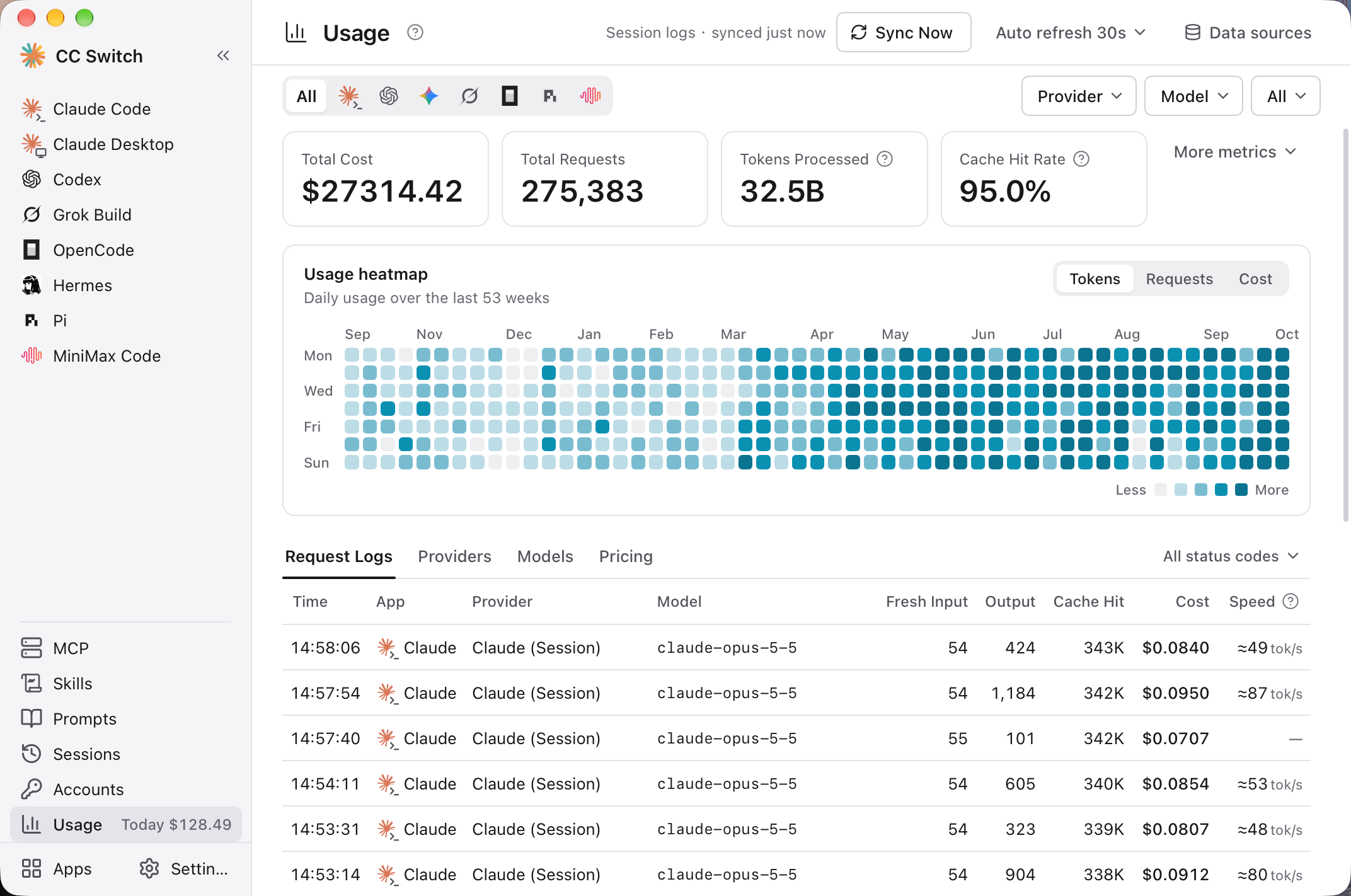
Output speed is now measured over generation time only, without the wait for the first token. Even without routing, requests imported from Claude Code and Codex session logs get an estimated speed, marked with "≈".
More Improvements
- MCP: Paste several server configs at once in JSON, TOML, Codex or OpenCode format. If writing to one app fails you can retry just that app, and one bad server no longer stops the others from syncing
- Skills: "Installed" and "Discover" are merged into one page with one-click "Update all", and you can choose the sync method: automatic, symlink only or copy only
- Prompts: Manage prompts for eight apps on one page, copy them to other apps, import existing files, and undo a delete
- Accounts: Accounts, re-login actions and remaining quota at a glance
- Model metadata autofill: When you pick a fetched model, its context window, output limit, reasoning levels and input types are filled in from presets and models.dev, without overwriting anything you've already entered
- Claude Desktop: With model mapping, the local routing service starts on its own and stops when no longer needed
- OpenCode: Comments and formatting in
opencode.jsoncsurvive sync, and OpenCode 2.x usage is tracked - MiniMax Code: Install and upgrade it from the Apps page, and choose your own provider key when creating a provider
- Presets and pricing: New Command Code preset; updated pricing for Claude Opus 5.5, GPT-6 Sol / Luna, MiMo V2.6 and more; all 756 presets now have proper icons
Fixes
- After quitting with
⌘Q, the Dock's "Quit" or logging out on macOS, clients stayed pointed at the stopped local routing service - Replies on the Codex official route appeared only after a long delay, with usage recorded as 0
- GPT models in the Codex model catalog lost their official prompts, tool capabilities and reasoning levels
- MiniMax tool calls failed to parse their arguments, and some models' thinking showed up mixed into the reply text
- Since Codex 0.158, the
typefield in MCP config caused errors and could even stop Codex from starting - Adding or importing a prompt could empty a prompt file you wrote by hand
- Syncing Skills deleted same-named folders inside OpenClaw's directory
- Upgrading some CLIs installed an extra npm copy
- The database file didn't shrink after old logs were pruned
- "Save and restart service" in settings didn't actually restart the service
Before You Upgrade
Where settings live has changed. Shared settings now stay in the client's own config file, and the "common config snippet" feature has been removed. A model or reasoning effort you pick temporarily in the client goes back to the provider's value when you switch away and back. To keep it, save it in the provider editor.
Some fixes take effect after one switch. The Codex model catalog and session history fixes apply the next time CC Switch writes the Codex config, so just switch providers once after upgrading. Re-sync your existing MCP config once to clear the old type field.
Restart when prompted after switching. Codex, Gemini CLI and Grok Build need a restart after switching models, and clients need a restart after the Aggregation list changes.
Existing cards stay as they are. Preset updates only apply to newly created providers. New pricing only backfills requests previously recorded at $0; other historical costs are not recalculated.
Two settings have been removed. Per-provider cost multipliers (relay prices already include their multiplier, so applying another one only skews the numbers), and the connectivity-check advanced settings (built-in defaults are used now).
Thanks
Thanks to everyone who contributed to this release:
@Owlbay (session reader redesign, usage heatmap and performance), @qyinter (extensive UI/UX polish), @funkpopo, @allenxu09, @ISuuuu, @SailingLoong, @ggbdpq, @tingfeng347, @Hexc01, @zhengkaics, @DEAN-Cherry, @7ten7, @2doright, @RemindZ, @M3chD09, @Richard-Zhang1019, @YuxuZhou-CN, @Eureka0w0v0, @Ne1ther, @h6rime, @bigben446, @szupzj18, @AnxForever
Thanks also to @PnutCN, @Aaron-WealthTech, @parkavenue9639, @RuriLothlorien, @Ming-Sir-69 for detailed bug reports and investigation that helped us pin down the problems.
Special thanks to the opencodex project; much of Aggregation's design benefits from its open-source exploration.
And thanks to everyone who filed an issue or helped reproduce a bug. For the full technical details, see the CHANGELOG.